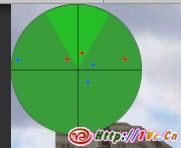
想给你游戏中增加个雷达么?Unity中可以很容易增加一个雷达.就像下面这样.当然.你可以让美术把雷达做的更好看一些.
将下面的脚本放在一个游戏对象上,给”blip”设置一个纹理.相当于雷达的信号效果.选择一个纹理作为雷达的背景(radarBG),设置地图在屏幕上的位置,设置一个游戏对象用于你雷达的centerObject(通常是目前的玩家对象).确保所有的”敌人”的标签tag都是”Enemy”.之后你就可以在你的游戏中看到雷达了.
两种语言任选其一.
@script ExecuteInEditMode()
// radar! by PsychicParrot, adapted from a Blitz3d script found in the public domain online somewhere ..
//Modified by Dastardly Banana to add radar size configuration, different colors for enemies in different states (patrolling or chasing), ability to move radar to either one of 9 preset locations or to custom location.
//some lines are particular to our AI script, you will need to change "EnemyAINew" to the name of your AI script, and change "isChasing" to the boolean within that AI script that is true when the enemy is active/can see the player/is chasing the player.
var blip : Texture; // texture to use when the enemy isn't chasing
var blipChasing : Texture; //When Chasing
var radarBG : Texture;
var centerObject : Transform;
var mapScale = 0.3;
var mapSizePercent = 15;
var checkAIscript : boolean = true;
var enemyTag = "Enemy";
enum radarLocationValues {topLeft, topCenter, topRight, middleLeft, middleCenter, middleRight, bottomLeft, bottomCenter, bottomRight, custom}
var radarLocation : radarLocationValues = radarLocationValues.bottomLeft;
private var mapWidth : float;
private var mapHeight : float;
private var mapCenter : Vector2;
var mapCenterCustom : Vector2;
function Start () {
setMapLocation();
}
function OnGUI () {
// GUI.matrix = Matrix4x4.TRS (Vector3.zero, Quaternion.identity, Vector3(Screen.width / 600.0, Screen.height / 450.0, 1));
// Draw player blip (centerObject)
bX=centerObject.transform.position.x * mapScale;
bY=centerObject.transform.position.z * mapScale;
GUI.DrawTexture(Rect(mapCenter.x - mapWidth/2,mapCenter.y-mapHeight/2,mapWidth,mapHeight),radarBG);
// Draw blips for Enemies
DrawBlipsForEnemies();
}
function drawBlip(go,aTexture){
centerPos=centerObject.position;
extPos=go.transform.position;
// first we need to get the distance of the enemy from the player
dist=Vector3.Distance(centerPos,extPos);
dx=centerPos.x-extPos.x; // how far to the side of the player is the enemy?
dz=centerPos.z-extPos.z; // how far in front or behind the player is the enemy?
// what's the angle to turn to face the enemy - compensating for the player's turning?
deltay=Mathf.Atan2(dx,dz)*Mathf.Rad2Deg - 270 - centerObject.eulerAngles.y;
// just basic trigonometry to find the point x,y (enemy's location) given the angle deltay
bX=dist*Mathf.Cos(deltay * Mathf.Deg2Rad);
bY=dist*Mathf.Sin(deltay * Mathf.Deg2Rad);
bX=bX*mapScale; // scales down the x-coordinate so that the plot stays within our radar
bY=bY*mapScale; // scales down the y-coordinate so that the plot stays within our radar
if(dist<=mapWidth*.5/mapScale){
// this is the diameter of our largest radar circle
GUI.DrawTexture(Rect(mapCenter.x+bX,mapCenter.y+bY,4,4),aTexture);
}
}
function DrawBlipsForEnemies(){
//You will need to replace isChasing with a variable from your AI script that is true when the enemy is chasing the player, or doing watever you want it to be doing when it is red on the radar.
//You will need to replace "EnemyAINew with the name of your AI script
// Find all game objects tagged Enemy
var gos : GameObject[];
gos = GameObject.FindGameObjectsWithTag(enemyTag);
var distance = Mathf.Infinity;
var position = transform.position;
// Iterate through them and call drawBlip function
for (var go : GameObject in gos) {
var blipChoice : Texture = blip;
if(checkAIscript){
var aiScript : EnemyAI = go.GetComponent("EnemyAI");
if(aiScript.isChasing)
blipChoice = blipChasing;
}
drawBlip(go,blipChoice);
}
}
function setMapLocation () {
mapWidth = Screen.width*mapSizePercent/100.0;
mapHeight = mapWidth;
//sets mapCenter based on enum selection
if(radarLocation == radarLocationValues.topLeft){
mapCenter = Vector2(mapWidth/2, mapHeight/2);
} else if(radarLocation == radarLocationValues.topCenter){
mapCenter = Vector2(Screen.width/2, mapHeight/2);
} else if(radarLocation == radarLocationValues.topRight){
mapCenter = Vector2(Screen.width-mapWidth/2, mapHeight/2);
} else if(radarLocation == radarLocationValues.middleLeft){
mapCenter = Vector2(mapWidth/2, Screen.height/2);
} else if(radarLocation == radarLocationValues.middleCenter){
mapCenter = Vector2(Screen.width/2, Screen.height/2);
} else if(radarLocation == radarLocationValues.middleRight){
mapCenter = Vector2(Screen.width-mapWidth/2, Screen.height/2);
} else if(radarLocation == radarLocationValues.bottomLeft){
mapCenter = Vector2(mapWidth/2, Screen.height - mapHeight/2);
} else if(radarLocation == radarLocationValues.bottomCenter){
mapCenter = Vector2(Screen.width/2, Screen.height - mapHeight/2);
} else if(radarLocation == radarLocationValues.bottomRight){
mapCenter = Vector2(Screen.width-mapWidth/2, Screen.height - mapHeight/2);
} else if(radarLocation == radarLocationValues.custom){
mapCenter = mapCenterCustom;
}
}
using UnityEngine;
using System.Collections;
public class Radar : MonoBehaviour
{
public enum RadarTypes : int {Textured, Round, Transparent};
public enum RadarLocations : int {TopLeft, TopCenter, TopRight, BottomLeft, BottomCenter, BottomRight, Left, Center, Right, Custom};
// Display Location
public RadarLocations radarLocation = RadarLocations.BottomCenter;
public Vector2 radarLocationCustom;
public RadarTypes radarType = RadarTypes.Round;
public Color radarBackgroundA = new Color(255, 255, 0);
public Color radarBackgroundB = new Color(0, 255, 255);
public Texture2D radarTexture;
public float radarSize = 0.20f; // The amount of the screen the radar will use
public float radarZoom = 0.60f;
// Center Object information
public bool radarCenterActive;
public Color radarCenterColor = new Color(255, 255, 255);
public string radarCenterTag;
// Blip information
public bool radarBlip1Active;
public Color radarBlip1Color = new Color(0, 0, 255);
public string radarBlip1Tag;
public bool radarBlip2Active;
public Color radarBlip2Color = new Color(0, 255, 0);
public string radarBlip2Tag;
public bool radarBlip3Active;
public Color radarBlip3Color = new Color(255, 0, 0);
public string radarBlip3Tag;
public bool radarBlip4Active;
public Color radarBlip4Color = new Color(255, 0, 255);
public string radarBlip4Tag;
// Internal vars
private GameObject _centerObject;
private int _radarWidth;
private int _radarHeight;
private Vector2 _radarCenter;
private Texture2D _radarCenterTexture;
private Texture2D _radarBlip1Texture;
private Texture2D _radarBlip2Texture;
private Texture2D _radarBlip3Texture;
private Texture2D _radarBlip4Texture;
// Initialize the radar
void Start ()
{
// Determine the size of the radar
_radarWidth = (int)(Screen.width * radarSize);
_radarHeight = _radarWidth;
// Get the location of the radar
setRadarLocation();
// Create the blip textures
_radarCenterTexture = new Texture2D(3, 3, TextureFormat.RGB24, false);
_radarBlip1Texture = new Texture2D(3, 3, TextureFormat.RGB24, false);
_radarBlip2Texture = new Texture2D(3, 3, TextureFormat.RGB24, false);
_radarBlip3Texture = new Texture2D(3, 3, TextureFormat.RGB24, false);
_radarBlip4Texture = new Texture2D(3, 3, TextureFormat.RGB24, false);
CreateBlipTexture(_radarCenterTexture, radarCenterColor);
CreateBlipTexture(_radarBlip1Texture, radarBlip1Color);
CreateBlipTexture(_radarBlip2Texture, radarBlip2Color);
CreateBlipTexture(_radarBlip3Texture, radarBlip3Color);
CreateBlipTexture(_radarBlip4Texture, radarBlip4Color);
// Setup the radar background texture
if (radarType != RadarTypes.Textured)
{
radarTexture = new Texture2D(_radarWidth, _radarHeight, TextureFormat.RGB24, false);
CreateRoundTexture(radarTexture, radarBackgroundA, radarBackgroundB);
}
// Get our center object
GameObject[] gos;
gos = GameObject.FindGameObjectsWithTag(radarCenterTag);
_centerObject = gos[0];
}
// Update is called once per frame
void OnGUI ()
{
GameObject[] gos;
// Draw th radar background
if (radarType != RadarTypes.Transparent)
{
Rect radarRect = new Rect(_radarCenter.x - _radarWidth / 2, _radarCenter.y - _radarHeight / 2, _radarWidth, _radarHeight);
GUI.DrawTexture(radarRect, radarTexture);
}
// Draw blips
if (radarBlip1Active)
{
// Find all game objects
gos = GameObject.FindGameObjectsWithTag(radarBlip1Tag);
// Iterate through them and call drawBlip function
foreach (GameObject go in gos)
{
drawBlip(go, _radarBlip1Texture);
}
}
if (radarBlip2Active)
{
gos = GameObject.FindGameObjectsWithTag(radarBlip2Tag);
foreach (GameObject go in gos)
{
drawBlip(go, _radarBlip2Texture);
}
}
if (radarBlip3Active)
{
gos = GameObject.FindGameObjectsWithTag(radarBlip3Tag);
foreach (GameObject go in gos)
{
drawBlip(go, _radarBlip3Texture);
}
}
if (radarBlip4Active)
{
gos = GameObject.FindGameObjectsWithTag(radarBlip4Tag);
foreach (GameObject go in gos)
{
drawBlip(go, _radarBlip4Texture);
}
}
// Draw center oject
if (radarCenterActive)
{
Rect centerRect = new Rect(_radarCenter.x - 1.5f, _radarCenter.y - 1.5f, 3, 3);
GUI.DrawTexture(centerRect, _radarCenterTexture);
}
}
// Draw a blip for an object
void drawBlip(GameObject go, Texture2D blipTexture)
{
if (_centerObject)
{
Vector3 centerPos = _centerObject.transform.position;
Vector3 extPos = go.transform.position;
// Get the distance to the object from the centerObject
float dist = Vector3.Distance(centerPos, extPos);
// Get the object's offset from the centerObject
float bX = centerPos.x - extPos.x;
float bY = centerPos.z - extPos.z;
// Scale the objects position to fit within the radar
bX = bX * radarZoom;
bY = bY * radarZoom;
// For a round radar, make sure we are within the circle
if(dist <= (_radarWidth - 2) * 0.5 / radarZoom)
{
Rect clipRect = new Rect(_radarCenter.x - bX - 1.5f, _radarCenter.y + bY - 1.5f, 3, 3);
GUI.DrawTexture(clipRect, blipTexture);
}
}
}
// Create the blip textures
void CreateBlipTexture(Texture2D tex, Color c)
{
Color[] cols = {c, c, c, c, c, c, c, c, c};
tex.SetPixels(cols, 0);
tex.Apply();
}
// Create a round bullseye texture
void CreateRoundTexture(Texture2D tex, Color a, Color b)
{
Color c = new Color(0, 0, 0);
int size = (int)((_radarWidth / 2) / 4);
// Clear the texture
for (int x = 0; x < _radarWidth; x++)
{
for (int y = 0; y < _radarWidth; y++)
{
tex.SetPixel(x, y, c);
}
}
for (int r = 4; r > 0; r--)
{
if (r % 2 == 0)
{
c = a;
}
else
{
c = b;
}
DrawFilledCircle(tex, (int)(_radarWidth / 2), (int)(_radarHeight / 2), (r * size), c);
}
tex.Apply();
}
// Draw a filled colored circle onto a texture
void DrawFilledCircle(Texture2D tex, int cx, int cy, int r, Color c)
{
for (int x = -r; x < r ; x++)
{
int height = (int)Mathf.Sqrt(r * r - x * x);
for (int y = -height; y < height; y++)
tex.SetPixel(x + cx, y + cy, c);
}
}
// Figure out where to put the radar
void setRadarLocation()
{
// Sets radarCenter based on enum selection
if(radarLocation == RadarLocations.TopLeft)
{
_radarCenter = new Vector2(_radarWidth / 2, _radarHeight / 2);
}
else if(radarLocation == RadarLocations.TopCenter)
{
_radarCenter = new Vector2(Screen.width / 2, _radarHeight / 2);
}
else if(radarLocation == RadarLocations.TopRight)
{
_radarCenter = new Vector2(Screen.width - _radarWidth / 2, _radarHeight / 2);
}
else if(radarLocation == RadarLocations.Left)
{
_radarCenter = new Vector2(_radarWidth / 2, Screen.height / 2);
}
else if(radarLocation == RadarLocations.Center)
{
_radarCenter = new Vector2(Screen.width / 2, Screen.height / 2);
}
else if(radarLocation == RadarLocations.Right)
{
_radarCenter = new Vector2(Screen.width - _radarWidth / 2, Screen.height / 2);
}
else if(radarLocation == RadarLocations.BottomLeft)
{
_radarCenter = new Vector2(_radarWidth / 2, Screen.height - _radarHeight / 2);
}
else if(radarLocation == RadarLocations.BottomCenter)
{
_radarCenter = new Vector2(Screen.width / 2, Screen.height - _radarHeight / 2);
}
else if(radarLocation == RadarLocations.BottomRight)
{
_radarCenter = new Vector2(Screen.width - _radarWidth / 2, Screen.height - _radarHeight / 2);
}
else if(radarLocation == RadarLocations.Custom)
{
_radarCenter = radarLocationCustom;
}
}
}